
Azure Arc Gateway is a managed component that funnels Azure Connected Machine and Arc agent traffic through a centralized gateway, so on‑premises or edge machines only need to reach a small set of public endpoints rather than many Azure services directly. It’s designed for environments with strict egress controls, TLS inspection, or corporate proxies and helps organizations onboard large fleets without opening broad outbound access.
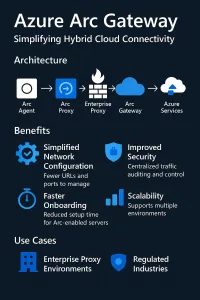
What Azure Arc Gateway does (functionality and benefits)
Azure Arc Gateway provides a consolidated egress channel for Azure Arc‑enabled servers and Kubernetes, meaning individual on‑premises or edge machines do not need direct access to the full set of Azure management endpoints. By routing agent traffic through the gateway, organizations can reduce firewall rule sprawl and limit public network access to a small number of fully qualified domain names rather than dozens of service endpoints, which greatly eases onboarding in locked‑down networks and corporate DMZs. The gateway also centralizes telemetry and control plane traffic, enabling auditing and visibility of what the Connected Machine agent sends to Azure; this helps with compliance, troubleshooting, and incident response because traffic can be logged and inspected at a single choke point.
Because all communication remains outbound initiated and TLS encrypted, the gateway preserves a low attack surface: Azure does not open inbound connections to your hosts and agents validate certificates when connecting to Azure through the gateway. The feature is explicitly designed to work with enterprise proxies and TLS inspection scenarios; you can configure agents or network proxy rules so gateway domains are routed appropriately, which simplifies proxy authentication and certificate handling across large fleets. Operationally, the gateway becomes a critical piece of infrastructure, so teams should plan for monitoring, high availability, and testing of any Arc extensions that might still require additional endpoints beyond the gateway.
In practice, adopting Azure Arc Gateway is most valuable when you manage many Arc resources behind strict egress controls, need a single auditable egress path for compliance, or want to minimize the number of public endpoints your security team must approve. It reduces operational overhead, improves visibility into agent traffic, and aligns Arc connectivity with enterprise proxy and TLS inspection policies, while still keeping the security posture of outbound‑only, encrypted communications
- Centralized egress proxy for Arc agents. Instead of each agent reaching many Azure endpoints, the gateway funnels agent traffic through a managed path so you only need to allow a small set of fully qualified domain names (FQDNs) outbound.
- Reduces network complexity. Microsoft documents that using the Arc Gateway can reduce the number of required public endpoints to seven FQDNs for Arc‑enabled servers, simplifying firewall and proxy configuration.
- Auditing and visibility. Gateway lets you view and audit the traffic that the Azure Connected Machine agent sends to Azure, which helps compliance and troubleshooting.
- Works with enterprise proxies. You can configure agents to use a corporate proxy that routes via the gateway, easing onboarding in locked‑down environments.
- Outbound‑only model and TLS. All agent communication is outbound and encrypted with TLS; Azure never initiates inbound connections to your machines
Firewall / proxy specifics — what to open and why
Allow outbound HTTPS (TCP 443) from your Arc hosts to the Azure Arc Gateway FQDNs and ensure DNS resolution for those names, because agent communication is TLS‑encrypted and initiated outbound only. Prefer allowing by FQDN rather than by IP because Azure IP ranges change. If you use a corporate proxy that performs TLS inspection, either bypass inspection for the gateway domains or import the proxy’s signing CA into the hosts’ trust store so the agent can validate certificates; otherwise TLS validation will fail. Configure proxy authentication at the system level (WinHTTP on Windows, environment variables or system proxy on Linux) so the Connected Machine agent can authenticate and route traffic. Allow DNS (UDP/TCP 53) to your DNS servers and enable logging on the proxy/firewall to monitor agent traffic. Before enforcing deny rules, test from representative hosts by resolving the gateway FQDNs and making an HTTPS request to confirm DNS, proxy auth, and TLS behavior.
To summaries:
- Allow outbound TCP 443 (HTTPS) to the Arc Gateway FQDNs. When Gateway is used, open outbound HTTPS to the gateway FQDNs (the seven public names the gateway exposes) rather than a long list of Azure endpoints.
- DNS resolution must be allowed. Firewalls must permit DNS lookups for those FQDNs so agents can resolve the gateway addresses.
- Proxy authentication and TLS inspection: If your proxy performs TLS inspection (MITM), either configure the proxy to bypass inspection for Arc agent/gateway traffic or ensure the proxy trusts the certificates used by the agent/gateway; otherwise agent TLS validation will fail.
- Do not rely on IP allowlists. Azure uses dynamic IP ranges; Microsoft recommends allowing by FQDN and not by IP where possible.
- Extensions and add‑ons: Some Arc extensions or management solutions require additional endpoints; review extension docs and open those endpoints as needed.
- Logging and audit: Enable logging on the gateway/proxy so you can audit agent traffic and detect anomalies—this is one of the gateway’s benefits
| Attribute | Direct Agent | Arc Gateway |
|---|---|---|
| Number of public endpoints | Many Azure endpoints; higher complexity | Reduced to ~7 FQDNs |
| Firewall Rules | Broad; many FQDNs/IPs | Small set of outbound FQDNs |
| Proxy Support | Works but complex | Designed to integrate with enterprise proxies |
| Audit / Visibility | Limited per‑agent logs | Centralized auditing of agent traffic |
| Recommended when | Small environments or permissive egress | Large fleets, strict egress, compliance needs |
Ready‑to‑apply firewall rule checklist
Essentials to allow
- Ports: TCP 443 outbound from Arc‑enabled machines to the Arc Gateway FQDNs.
- DNS: Allow DNS resolution for the gateway FQDNs (UDP/TCP 53 to your DNS servers).
- Protocol: HTTPS/TLS (do not terminate or re‑sign unless proxy is trusted).
- Direction: Outbound only; Azure does not initiate inbound connections to your hosts. .
FQDNs to allow
- Primary: the Azure Arc Gateway FQDNs created when you provision the gateway (the gateway exposes ~seven public FQDNs for Arc agents). Replace placeholders below with the exact FQDNs shown in your Azure portal:
arc-gateway-<region>.azure-arc.microsoft.com;*.arc-gateway.<tenant>.azure.com; (use the exact names from your gateway resource). Do not rely on static IPs — use FQDN allowlists. .
Firewall rules (example, vendor‑agnostic)
Rule 1 (Allow): Source = Arc subnet or host IPs; Destination = gateway FQDNs; Protocol = TCP; Port = 443; Action = Allow.
Rule 2 (Allow DNS): Source = Arc hosts; Destination = DNS servers; Protocol = UDP/TCP; Port = 53; Action = Allow.
Rule 3 (Deny other outbound Azure endpoints): Source = Arc hosts; Destination = Azure management endpoints; Action = Deny (only after validating gateway works and extensions tested).
Proxy exceptions and TLS inspection
If your proxy performs TLS inspection, either exempt the Azure Arc Gateway domains from interception or ensure the proxy’s signing CA is installed and trusted on every Arc host so the agent can validate re‑signed certificates; otherwise TLS handshakes will fail. Configure system‑level proxy settings (WinHTTP on Windows, environment variables or system proxy on Linux) so the Connected Machine agent can authenticate and route through the corporate proxy, and use a PAC file to send gateway FQDNs directly while routing other traffic via the proxy. Allow DNS resolution for gateway names and enable proxy/firewall logging to monitor agent connections. Validate by resolving gateway FQDNs and performing an HTTPS request from representative hosts before enforcing deny rules.
- Bypass TLS inspection for gateway FQDNs where possible. If TLS inspection is mandatory, import and trust the proxy’s CA on Arc hosts and ensure the proxy does not break certificate pinning for agent traffic. If the proxy re‑signs TLS, the agent must trust the proxy CA or connections will fail.
- Proxy auth: If your proxy requires authentication, configure the Connected Machine agent or host system proxy settings (WinHTTP / environment variables) so the agent can authenticate and route via the proxy to the gateway FQDNs
Azure ARC Gateway for Azure Local
The Azure Arc gateway for Azure Local (formerly Azure Stack HCI) streamlines deployments by reducing the number of outbound endpoints required for Azure-connected operations. Available for Azure Local versions 2506 and later, it introduces two main components: the Arc gateway resource, which serves as a unified entry point for Azure traffic, and the Arc proxy, a forward‑proxy service added to Arc agents on each machine.
When enabled during deployment, the gateway centralizes HTTPS traffic from Azure Local hosts, Azure Arc Resource Bridge, AKS clusters, and Azure Local VMs. Traffic not supported by the gateway is automatically routed through the enterprise proxy or firewall. HTTP traffic is never routed through the gateway and must be allowed directly.
Supported scenarios include enabling the gateway during new deployments and sharing a single gateway across Azure Local infrastructure and workloads (within the same subscription). It cannot be enabled after deployment. Some Azure endpoints—such as authentication, Key Vault, and certificate revocation list URLs—must still bypass the gateway and be explicitly allowed.
The gateway does not support TLS‑terminating proxies. Azure provides portal, CLI, and PowerShell methods to create, update, or delete the gateway resource, though creation may be delayed due to temporary Azure Front Door issues.

Setup Azure ARC Gateway
Browse to https://portal.azure.com/#view/Microsoft_Azure_ArcCenterUX/ArcCenterMenuBlade/~/arcGateways and click Create
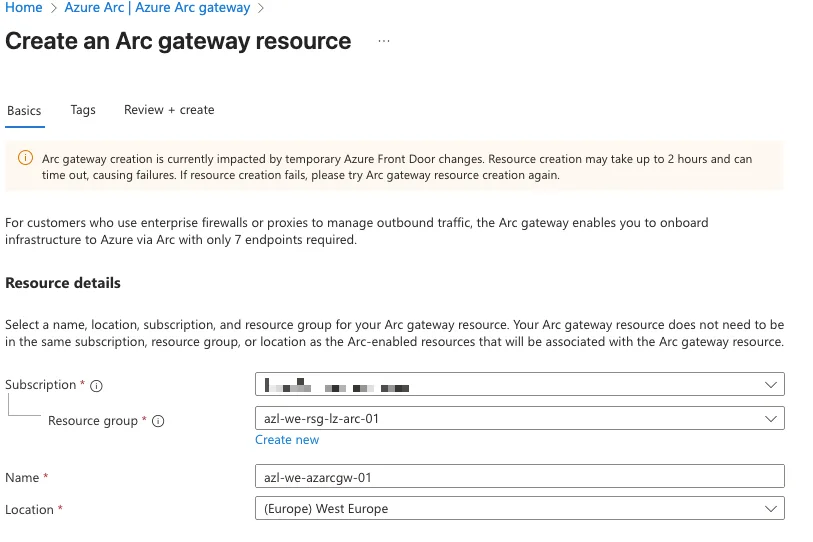
Provide the correct information and click Create.
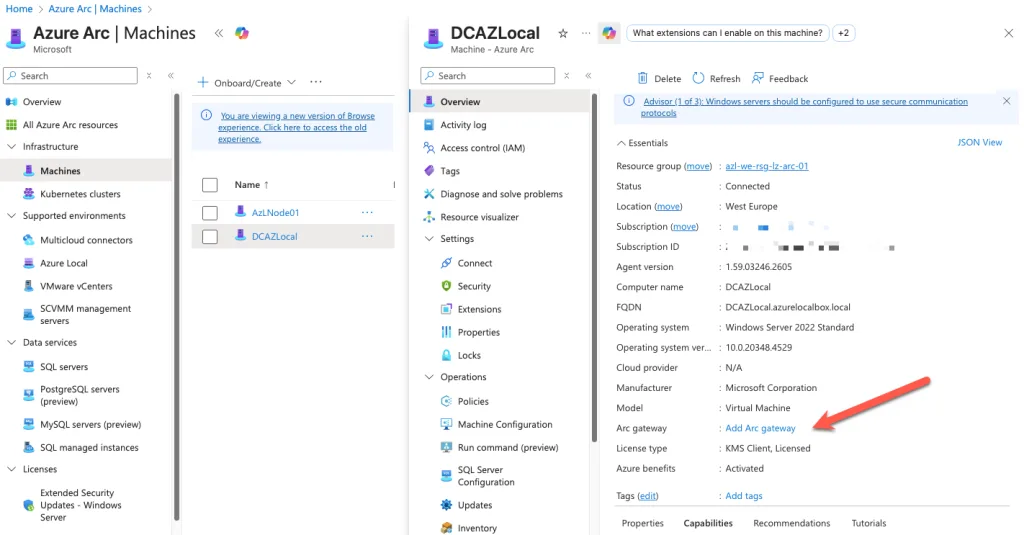
Connect ARC resource to ARC Gateway
Once the Arc Gateway is deployed, the next step is to associate your Azure Local resources with it so they can route all Arc‑related traffic through the gateway instead of reaching Azure directly. This association is what turns the gateway from “just another Arc‑enabled server” into the central relay point for your environment.
In Azure, the association is done at the resource level. Each Azure Local node, cluster resource, or Arc‑enabled server must be linked to the gateway so that the Connected Machine agent knows where to send its traffic. Without this step, the node will continue attempting to communicate with Azure endpoints directly, which defeats the purpose of using a gateway in the first place.
The association process is straightforward. In the Azure portal, navigate to the Arc Gateway resource and open the Associated Resources section. From there, you can add the machines or clusters that should use the gateway. When you select a resource, Azure updates its configuration so that all Arc agent communication—identity, telemetry, extension management, policy, and configuration—flows through the gateway. This effectively centralizes outbound connectivity and reduces the number of firewall rules you need to maintain.
Once the association is complete, the Arc agent on each node automatically reconfigures itself. You don’t need to reinstall anything or run additional scripts. The agent simply begins using the gateway as its proxy. This is particularly useful in environments with strict egress controls, because it ensures that only the gateway requires outbound access to Azure, while the nodes communicate solely over your internal network.