

Azure Local | HomeLab setup – Private Endpoints

AzureLocalHomeLab
Reading Time: 2 minutes

As organizations adopt hybrid cloud architectures, many expect Azure Local (formerly Azure Stack HCI with Azure Arc–enabled infrastructure) to mirror the full breadth of Azure networking capabilities. One of the most common points of confusion arises around Azure Private Endpoints. Although Private Link is a cornerstone of secure connectivity within Azure, Microsoft’s documentation makes it clear that Azure Local does not support Private Endpoints.
Image

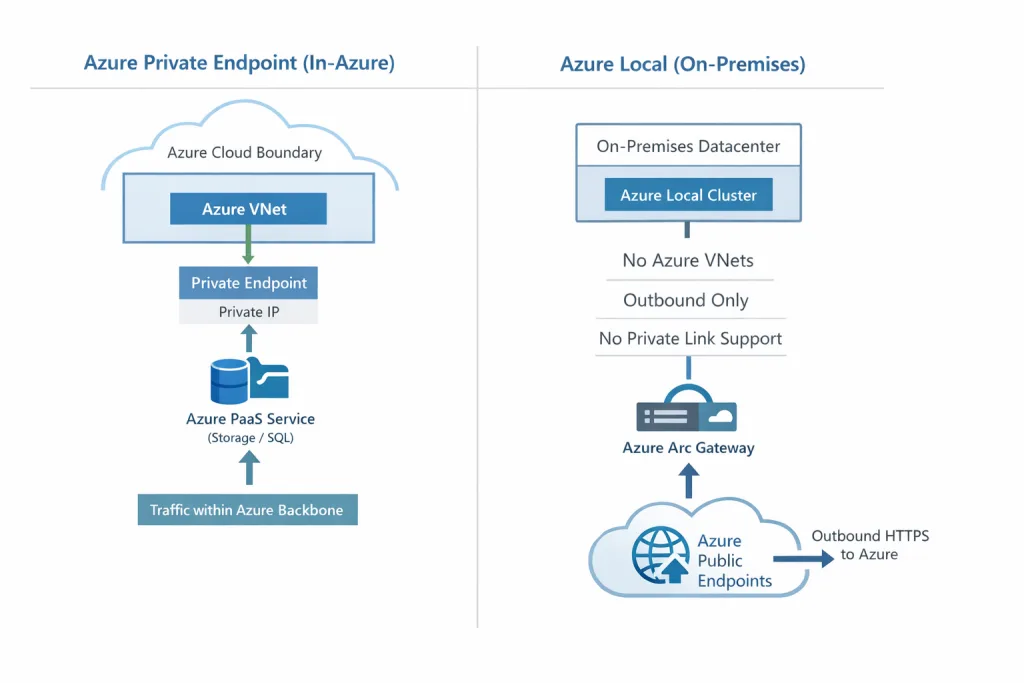
Azure Private Endpoints are built entirely on Azure’s internal networking fabric. They rely on Azure virtual networks, Azure-managed network interfaces, and routing through the Azure backbone. When a private endpoint is created, Azure injects a private IP into a VNet and binds it to a PaaS service. All traffic then flows privately within Azure’s controlled environment. This model is inseparable from Azure’s own infrastructure.

Azure Local operates in a fundamentally different context.

It runs inside an organization’s datacenter, on its own physical network, and connects to Azure exclusively through outbound HTTPS. It does not host Azure VNets, Azure NICs, or any of the routing constructs required for Private Link. Even the Azure Arc gateway—designed to centralize and reduce outbound connectivity—functions as a forward proxy, not as a Private Link endpoint. It still communicates with Azure’s public service endpoints rather than private ones.

This separation means Azure Local cannot participate in Azure’s private routing fabric. Its security model is built instead on outbound-only communication, certificate-based authentication, and tightly controlled firewall rules. While this approach differs from Private Link, it is purpose-built for hybrid environments where Azure services must be reachable securely without extending Azure’s internal network into on-premises infrastructure.

Azure Local and Azure Private Endpoints therefore represent two parallel connectivity models, each optimized for its own environment. Azure Local emphasizes secure outbound communication from on-premises systems, while Private Link provides private, in-Azure connectivity for cloud-native workloads. Understanding this distinction helps organizations design hybrid architectures that align with the capabilities and intent of each platform.
Share and Enjoy !

Shares
Designer (23)

Stay close to the action—follow GetToThe.Cloud across social!
Deep dives and hands‑on how‑tos on Azure Local, hybrid cloud, automation, PowerShell/Bicep, AVD + FSLogix, image pipelines, monitoring, networking, and resilient design when the internet/Azure is down.

🔗 Our channels
▶️ YouTube: https://www.youtube.com/channel/UCa33PgGdXt-Dr4w3Ub9hrdQ
💼 LinkedIn Group: https://www.linkedin.com/groups/9181126/
✖️ X (Twitter): https://x.com/Gettothecloud
🎵 TikTok: https://www.tiktok.com/@gettothecloud
🐙 GitHub: https://github.com/GetToThe-Cloud/Website
💬 Slack: DM us for an invite
📲 WhatsApp: DM for the community link

We use cookies to personalise content and ads, to provide social media features and to analyse our traffic. We also share information about your use of our site with our social media, advertising and analytics partners. View more
Cookies settings
Accept
Privacy & Cookie policy
Privacy & Cookies policy
Cookie name Active

Who we are

Our website address is: https://www.gettothe.cloud

Comments

When visitors leave comments on the site we collect the data shown in the comments form, and also the visitor’s IP address and browser user agent string to help spam detection. An anonymized string created from your email address (also called a hash) may be provided to the Gravatar service to see if you are using it. The Gravatar service privacy policy is available here: https://automattic.com/privacy/. After approval of your comment, your profile picture is visible to the public in the context of your comment.

Media

If you upload images to the website, you should avoid uploading images with embedded location data (EXIF GPS) included. Visitors to the website can download and extract any location data from images on the website.

Cookies

If you leave a comment on our site you may opt-in to saving your name, email address and website in cookies. These are for your convenience so that you do not have to fill in your details again when you leave another comment. These cookies will last for one year. If you visit our login page, we will set a temporary cookie to determine if your browser accepts cookies. This cookie contains no personal data and is discarded when you close your browser. When you log in, we will also set up several cookies to save your login information and your screen display choices. Login cookies last for two days, and screen options cookies last for a year. If you select "Remember Me", your login will persist for two weeks. If you log out of your account, the login cookies will be removed. If you edit or publish an article, an additional cookie will be saved in your browser. This cookie includes no personal data and simply indicates the post ID of the article you just edited. It expires after 1 day.

Embedded content from other websites

Articles on this site may include embedded content (e.g. videos, images, articles, etc.). Embedded content from other websites behaves in the exact same way as if the visitor has visited the other website. These websites may collect data about you, use cookies, embed additional third-party tracking, and monitor your interaction with that embedded content, including tracking your interaction with the embedded content if you have an account and are logged in to that website.

Who we share your data with

If you request a password reset, your IP address will be included in the reset email.

How long we retain your data

If you leave a comment, the comment and its metadata are retained indefinitely. This is so we can recognize and approve any follow-up comments automatically instead of holding them in a moderation queue. For users that register on our website (if any), we also store the personal information they provide in their user profile. All users can see, edit, or delete their personal information at any time (except they cannot change their username). Website administrators can also see and edit that information.

What rights you have over your data

If you have an account on this site, or have left comments, you can request to receive an exported file of the personal data we hold about you, including any data you have provided to us. You can also request that we erase any personal data we hold about you. This does not include any data we are obliged to keep for administrative, legal, or security purposes.

Where we send your data

Visitor comments may be checked through an automated spam detection service.
Save settings
Cookies settings
