
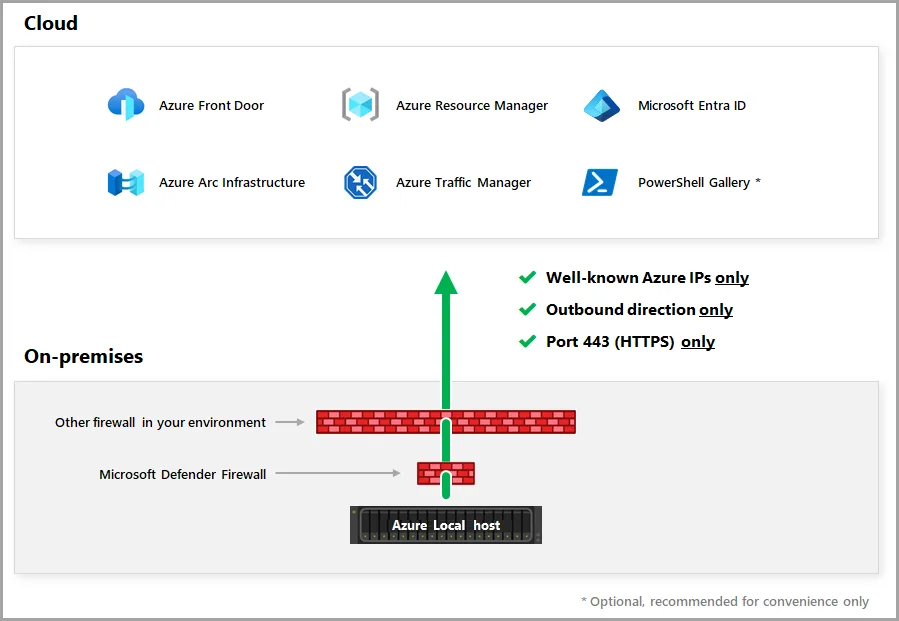
Setting up Azure Local requires more than just preparing the hardware and configuring the operating system. One of the most important but often overlooked aspects is ensuring that the necessary firewall rules and outbound connectivity are in place before the installation begins. Azure Local relies heavily on Azure services during deployment, registration, and ongoing management, which means the node must be able to reach a specific set of endpoints throughout the entire setup process. Without this connectivity, the installation may fail midway, Arc registration might not complete, or the node could become stuck waiting for services it cannot access.
When the Azure Local installer starts, it immediately begins communicating with Azure to validate licensing, retrieve configuration packages, and authenticate the environment. This communication happens over secure outbound connections, and the node must be able to reach Azure Resource Manager, Azure Active Directory, and several service-specific endpoints. These connections ensure that the node can register itself, download the necessary components, and establish trust with the tenant you prepared earlier. If any of these endpoints are blocked by a firewall or proxy, the installer may report vague errors that are difficult to troubleshoot, making it essential to verify connectivity ahead of time.
During the Azure Arc onboarding phase, the node also needs to communicate with the Azure Connected Machine agent services. This step is crucial because Azure Local uses Arc as its management plane, and the node cannot proceed without successfully registering. The Arc agent requires access to endpoints responsible for identity, telemetry, configuration, and extension management. Even temporary interruptions can cause delays or failures, so stable outbound connectivity is key. In environments with strict firewall policies, it is wise to review the required URLs and ensure they are allowed before you begin the installation.
Once Azure Local is fully deployed, the node continues to rely on these endpoints for updates, monitoring, and lifecycle operations. Azure Local is designed to behave like an extension of Azure, which means it expects to maintain a continuous connection to the cloud. Ensuring that the required firewall rules are in place from the beginning helps avoid operational issues later and keeps the environment aligned with Microsoft’s support requirements. https://learn.microsoft.com/en-us/azure/azure-local/concepts/firewall-requirements?view=azloc-2512#required-firewall-urls-for-azure-local-deployments
| Purpose | Required URL / Pattern | Notes |
|---|---|---|
| Azure Resource Manager | https://management.azure.com | Used for deployment, configuration, and resource operations. |
| Azure Active Directory (Microsoft Entra ID) | https://login.microsoftonline.com | Required for authentication and token retrieval. |
| Azure Active Directory (MSA/Token CDN) | https://aadcdn.msftauth.net | Supports identity flows and token services. |
| Azure Active Directory (Login CDN) | https://logincdn.msftauth.net | Required for login UI and authentication redirects. |
| Azure Arc Agent Service | https://agentserviceapi.azure-automation.net | Enables Arc onboarding and agent communication. |
| Azure Arc Hybrid Compute | https://hybridcompute.azure-automation.net | Required for Arc machine registration and management. |
| Azure Arc Guest Configuration | https://guestconfiguration.azure.com | Supports policy and configuration management. |
| Azure Arc Extension Service | https://extensionservice.azure-automation.net | Required for installing and managing Arc extensions. |
| Azure Monitoring / Telemetry | https://dc.services.visualstudio.com | Sends diagnostic and telemetry data. |
| Azure Package Downloads | https://packages.microsoft.com | Required for downloading components and updates. |
| Azure Local Updates | https://*.azureedge.net | Used for content delivery and update packages. |
| Time Synchronization | time.windows.com | Required for accurate time during installation and |
Using an Azure Arc Gateway is a smart way to simplify firewall management in environments where outbound connectivity is tightly controlled. Instead of allowing every Azure Local node to reach dozens of Azure endpoints directly, the Arc Gateway acts as a single, centralized relay. All Arc‑related traffic flows through that gateway, dramatically reducing the number of URLs you need to maintain and monitor.
When you deploy Azure Local without a gateway, each node must independently reach the full list of required Azure services for authentication, configuration, telemetry, extension management, and updates. That means every node needs outbound access to identity endpoints, Arc agent services, package repositories, and time sources. In a homelab this is manageable, but in a production environment with strict firewall rules, maintaining that list across multiple nodes can become tedious and error‑prone.
To maintain this list which is also linked before, you can simplify it also with an Azure ARC Gateway. https://www.gettothe.cloud/azure-local-homelab-setup-arc-gateway