
Another month, another Azure Local release. And this one brings several long-awaited improvements that make managing Azure Local clusters easier, especially for operators running larger environments or multiple locations.
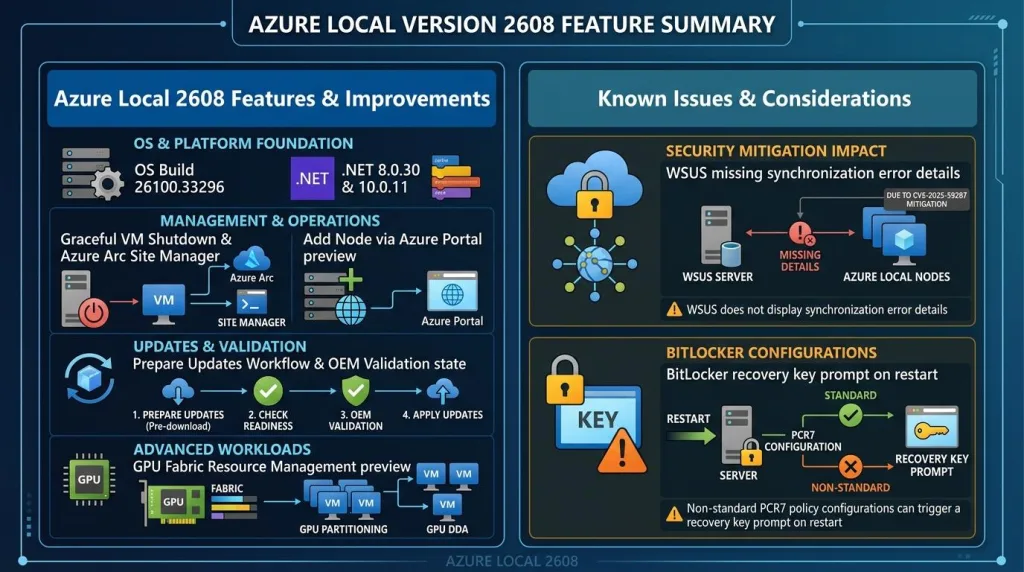
The August 2026 release (12.2608.1003.8) upgrades Azure Local to OS build 26100.33296 and introduces new capabilities around VM lifecycle management, cluster scaling, update orchestration, and GPU operations. Let’s dive into the highlights.
Graceful VM Shutdown Finally Arrives
One of the most requested improvements is now available directly from the Azure portal.
Previously, stopping an Azure Local VM from Azure was essentially the equivalent of pulling the power cable. With this release, administrators can choose between:
- Shut down (recommended) – performs a proper guest OS shutdown
- Turn off – immediately powers off the VM
It sounds simple, but it brings Azure Local much closer to the cloud experience administrators are used to when managing Azure virtual machines.
Requires Azure Local version 2604 or later.
Azure Arc Site Manager Gets Azure Local Support (Preview)
Managing multiple Azure Local deployments can become challenging as environments grow.
The new Azure Arc Site Manager preview introduces centralized visibility for:
- Azure Local virtual machines
- Kubernetes clusters
- Distributed edge locations
For organizations running workloads across factories, branch offices, retail locations, or datacenters, this is a significant step toward a true single-pane-of-glass experience.
Scale Out Your Cluster from the Azure Portal (Preview)
Adding a node to an Azure Local cluster traditionally required a fairly manual workflow.
Microsoft is now bringing cluster expansion directly into Azure through a guided wizard experience.
The preview allows administrators to:
- Add additional nodes remotely
- Validate prerequisites
- Execute the scale-out process through Azure management interfaces
For anyone responsible for growing Azure Local environments, this should significantly simplify operational procedures.
Prepare Updates Before Your Maintenance Window
One of my favorite additions in this release is the new Prepare Updates workflow.
Instead of downloading update packages during a maintenance window, administrators can now:
- Download updates ahead of time
- Stage them on the cluster
- Execute the installation when the maintenance window begins
This reduces update duration and helps make planned maintenance more predictable.
For organizations with strict change windows, this feature is going to be extremely useful.
GPU Management from Azure (Preview)
GPU-enabled workloads continue to grow, especially with AI and machine learning deployments.
This release introduces Azure-based GPU management capabilities, allowing operators to:
- Inventory host GPUs
- Create GPU partitions
- Assign GPU resources to workloads
- Monitor GPU utilization
All from Azure management experiences.
This is another example of Microsoft moving more traditional infrastructure management into the Azure control plane.
Platform Improvements
Beyond the new features, there are several important platform updates.
Updated OS Baseline
All deployments are now aligned on:
OS Build 26100.33296
Before updating, ensure your hardware vendor provides drivers compatible with:
- OS Build 26100.33296
- Windows Server 2025
Updated Runtime Components
The release also refreshes underlying runtime dependencies, including:
- .NET 8.0.30
- .NET 10.0.11
- Updated ASP.NET Core components
While mostly operational under-the-hood changes, keeping runtime components current remains important for security and supportability.
Better Lifecycle Visibility
Update workflows now include a new status:
Pending OEM Validation
This makes it easier to understand why an update isn’t progressing and whether hardware vendor certification is the blocking factor.
Fixed Issues
The release contains multiple reliability improvements, including:
- General platform stability fixes
- DFS mapped drive reconnection improvements in File Explorer
- Restored support for Post-Quantum Cryptography (PQC) certificate enrollment during CA configuration
Good to see PQC enhancements continuing to appear across the Microsoft stack.
Known Issues
WSUS Synchronization Error Details Missing
Administrators using WSUS may notice synchronization failures are no longer exposed through standard reporting.
Microsoft temporarily removed the functionality as part of mitigations for:
CVE-2025-59287
Currently no specific workaround is available beyond reviewing upstream WSUS synchronization logs manually.
BitLocker Recovery Prompts After Updating
Some systems may unexpectedly request a BitLocker recovery key after the first reboot following installation.
The issue is related to specific Group Policy configurations where:
- PCR7 is explicitly configured
- TPM validation profiles are customized
- Certain Secure Boot CA conditions exist
Before updating, Microsoft recommends verifying that:
Configure TPM platform validation profile for native UEFI firmware configurations
is set to:
Not Configured
If necessary:
gpupdate /force
manage-bde -protectors -disable C:
After the update:
manage-bde -protectors -enable C:Upgrade Planning Notes
- Verify OEM Driver Compatibility: Ensure hardware vendor drivers match OS build 26100.33296 or Windows Server 2025 before starting updates.
- Audit BitLocker Policies: Pre-check BitLocker Group Policy settings across node targets to ensure PCR7 isn’t explicitly forced in TPM validation profiles, preventing unexpected recovery key prompts on node reboots.
- Staging Updates: Take advantage of the new Prepare Updates workflow to staging binaries ahead of planned outage windows.