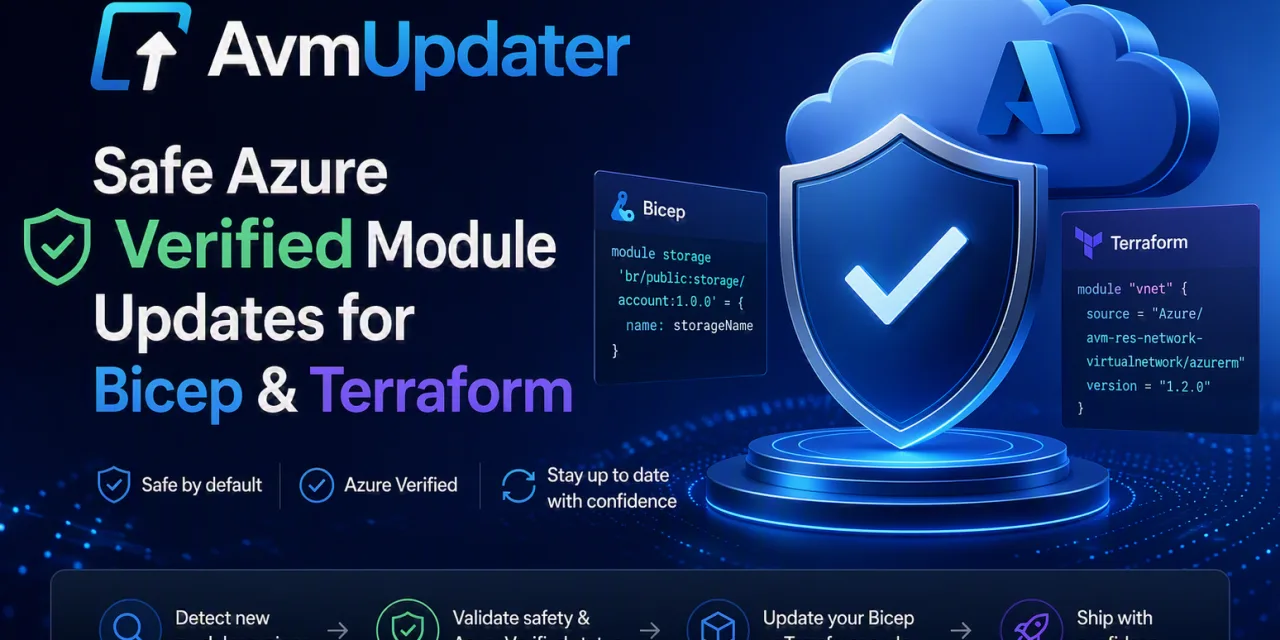

Azure Verified Modules are one of the best things to happen to Bicep and Terraform in a long time: tested, maintained, opinionated building blocks you don’t have to write yourself. But they share one awkward truth with every fast-moving open-source project: they evolve constantly, and most of them are still pre-1.0.
And that’s where the quiet risk lives. AvmUpdater is built to take that risk off your plate.
The real challenge with keeping AVM modules current
On paper, updating a module version is trivial. You bump a number and move on. In practice, across a real repository, it’s anything but:
- Module references are scattered across dozens of
.bicepand.tffiles, and checking each one by hand is tedious work you’d rather spend building. - Because AVM uses 0.x versioning, a minor bump isn’t a safe bump. A minor version can remove a parameter, change a type, or rename an output, and silently break your IaC.
- The breaking change rarely announces itself. You find out at
plantime, or worse, at deploy time.
So most teams do the sensible thing: they pin versions and stop looking. Which is safe right up until it isn’t, the day you finally need to move and discover you’re twelve versions behind.
That’s exactly the gap AvmUpdater is designed to close.
Introducing AvmUpdater
AvmUpdater is a free, open-source PowerShell tool that scans your Bicep and Terraform code for outdated AVM modules, ranks every available update by risk, waits for your approval, and then applies each one safely, rolling back anything that fails validation.
The key principle is simple: no change is written unless it survives validation.
No blind bumps. No “hope it plans clean.” Just safe, evidence-based updates.
How it works (four clear steps, one human gate)
One of the things I like most about how this turned out is that the flow stays honest and easy to follow:
- Scan. Walks your Bicep and Terraform files, finds every AVM module reference, and compares the current version against the latest available.
- Report. Generates a clear Markdown and JSON overview of every available update, ranked by risk, flagging potential breaking changes to the interface, parameters, and outputs.
- Approve. You decide what gets applied. Interactively in the local CLI, or via a GitHub / Azure DevOps Pull Request where merge equals approval.
- Safe update. Bumps the version references, then runs
bicep build/lintorterraform init/validate/plan, detects destroy/replace operations, and rolls back any file that fails.
The human approval gate sits right in the middle, on purpose. The tool does the tedious part; the decision stays yours.
Three layers of breaking-change protection
This is the part that matters most, so it’s worth pulling apart. AvmUpdater doesn’t trust a version number on its own. It checks an update three ways before committing anything:
- Version semantics. Understands what a patch / minor / major bump actually means on a 0.x module.
- Interface diffs. Detects changes to parameters, types, and outputs before you apply them.
- Toolchain validation. Validates the result with the real IaC toolchain (
bicep build/lint,terraform init/validate/plan), not a guess.
And if a single file fails? Per-file rollback. Only that file is reverted, and every other successful update stays. It’s also idempotent: run it ten times and you get the same result.
Risk tiers, so you know what you’re looking at
Every update lands in one of four tiers, so the report tells you where to spend your attention:
| Tier | Meaning |
|---|---|
| LOW | Patch bump, no detected interface changes |
| MEDIUM | Minor bump on 0.x, no breaking signals detected |
| HIGH | Major bump or detected breaking interface changes |
| UNKNOWN | Diff and changelog both unavailable |
All tiers are included in the PR by default. You review the diff and the attached report artifact before merging. Which tiers actually trigger a PR is yours to configure.
Three ways to approve
Because not every team works the same way:
- Local CLI. Approve interactively on your own machine.
- GitHub Pull Request. Open a PR, merge to approve.
- Azure DevOps Pull Request. Same model, ADO-native.
Automate it (without handing over the keys)
Drop AvmUpdater into GitHub Actions or Azure DevOps and let it run on a schedule, out of the box a weekly run (Mondays, 08:00 UTC). When updates are available, it opens a Pull Request with the report attached.
Possible to run manually and set custom settings:
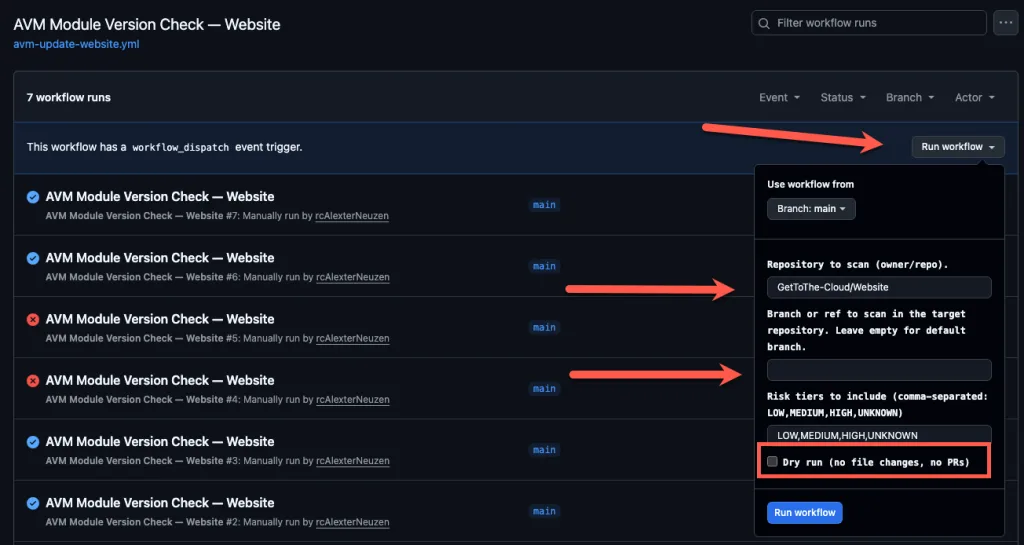
Choose which repository and branch. Use the Dry Run option just to see the outcome.
The important word here: never auto-merged. The pipeline creates the PR, and a human always reviews and merges. Automation finds the work; you stay in control of what ships.
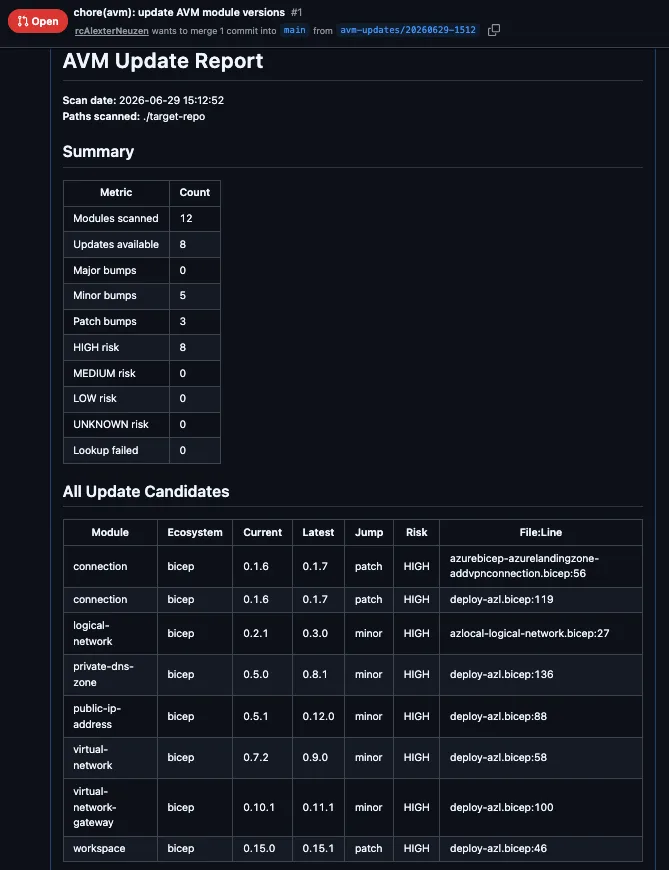
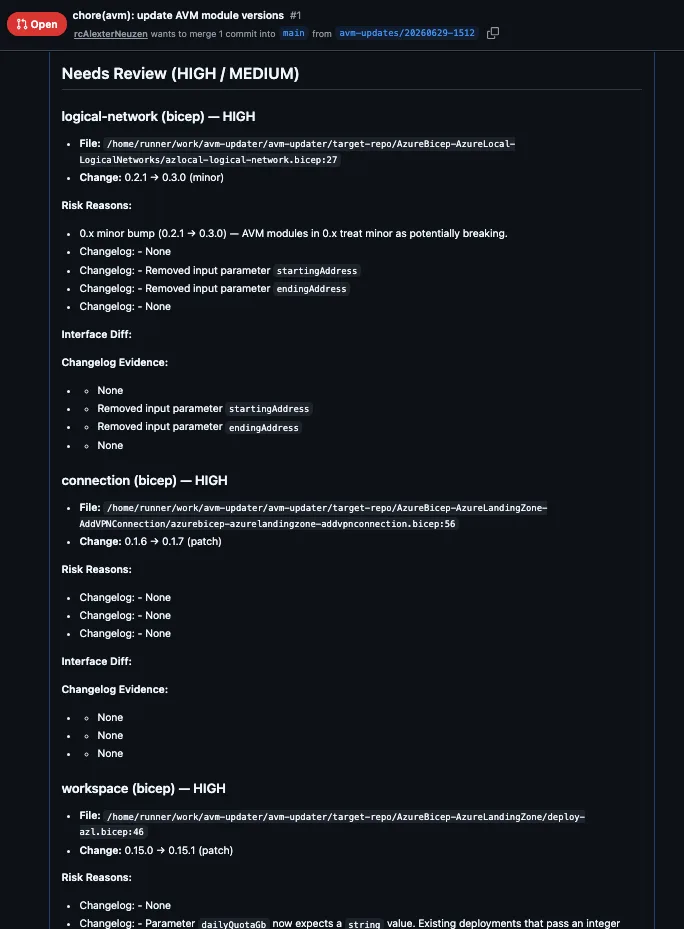
The PR is requested and can be reviewed including the change log per module.
# Requires PowerShell 7+
git clone https://github.com/gettothe-cloud/avm-updater.git
Import-Module ./AvmUpdater
Invoke-AvmUpdate -Path . -ApprovalMode localThat’s the whole quick start. Clone, import, scan.
Why this matters
The real value here isn’t “tidier version numbers.” It’s the shift from:
- staying behind → staying current
- manual tracking → automated scanning
- silent breaking changes → ranked, visible risk
- all-or-nothing updates → per-file safety
Staying on the latest AVM modules stops being a scary, batch-it-up-for-later chore and becomes a routine, low-drama PR you actually trust.
Who this is for
If you write or maintain Azure IaC, you’ll recognise the pain immediately:
- Platform / Cloud engineers keeping a large Bicep or Terraform estate current
- Consultants / MSPs managing IaC across many client repos
- DevOps / pipeline owners who want scheduled, reviewable update PRs
- Anyone who has ever been bitten by a “minor” 0.x bump
Where to find it
Free, MIT-licensed, no sign-up, no paywall. Clone it, fork it, break it, send a PR.
AvmUpdater is an independent, community open-source project. It is not affiliated with, endorsed by, or sponsored by Microsoft. “Azure” and “Azure Verified Modules” are trademarks of Microsoft.
Share and Enjoy !