
Azure Active Directory | Authentication Policies

Header mfa1
Reading Time: 3 minutes

Microsoft has announced that legacy multifactor authentication and self-service password reset policies will be deprecated in January 2024. The new Microsoft Entra Admin center will provide with a wizard to migrate the legacy policies to the new Authentication methods policies.

Legacy policies

Multifactor authentication policyAuthentication method policy
Call to phoneVoice calls
Text message to phoneSMS
Notification through mobile appMicrosoft Authenticator
Verification code from mobile app or hardware tokenThird party software OATH tokens
Hardware OATH tokens (not yet available)
Microsoft Authenticator
table 1 legacy multi factor authentication policies

The policies above are tenant-wide and there is no need for user or group information. Every user gets the same options.

SSPR authentication methodsAuthentication method policy
Mobile app notificationMicrosoft Authenticator
Mobile app codeMicrosoft Authenticator
Software OATH tokens
EmailEmail OTP
Mobile phoneVoice calls
SMS
Office phoneVoice calls
Security questionsNot yet available; copy questions for later use
table 2 legacy SSPR policy

Authentication methods policy

With Microsoft Entra you will be able to navigate to Azure Active Directory -> Protect & secure -> Authentication methods. You will find by default all the policies disabled. But there is also an option to migrate current policies to the new authentication policies. It is still in preview but it already works like a charm.
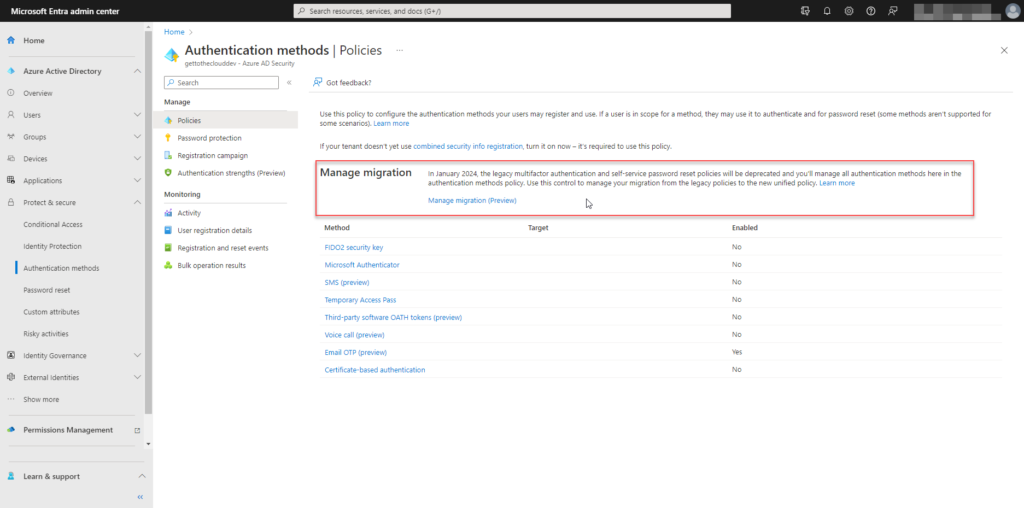
figure 1 Microsoft Entra Authentication Policies

Enabling the new authentication policies, can have a huge impact. Therefore Microsoft enables to respect the legacy (tenant) policies and run the new policies for the users that do not match the new policies. Users will be able to change there authentication themself.

New additions to these policies are FIDO2 security key, Temporary Access Pass, and Azure AD certificate-based authentication. With these policies the setting can be defined to a user or a group or all users. It is possible now to enable multiple multifactor or more secure for high risk users.

Microsoft recommends passwordless authentication methods such as Windows Hello, FIDO2 security keys, and the Microsoft Authenticator app because they provide the most secure sign-in experience. Although a user can sign-in using other common methods such as a username and password, passwords should be replaced with more secure authentication methods.
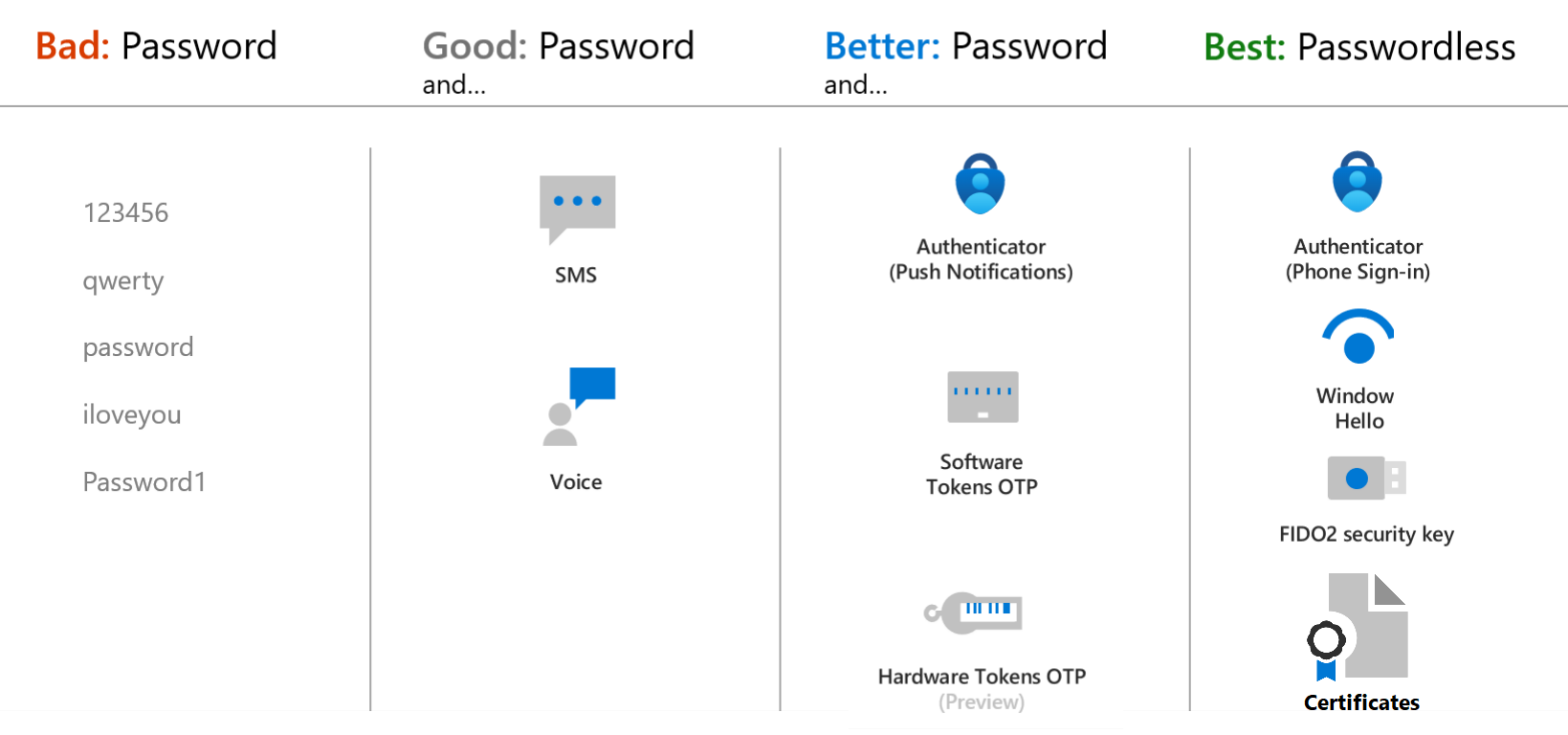
The Microsoft Authenticator app can be enabled for passwordless sign on.
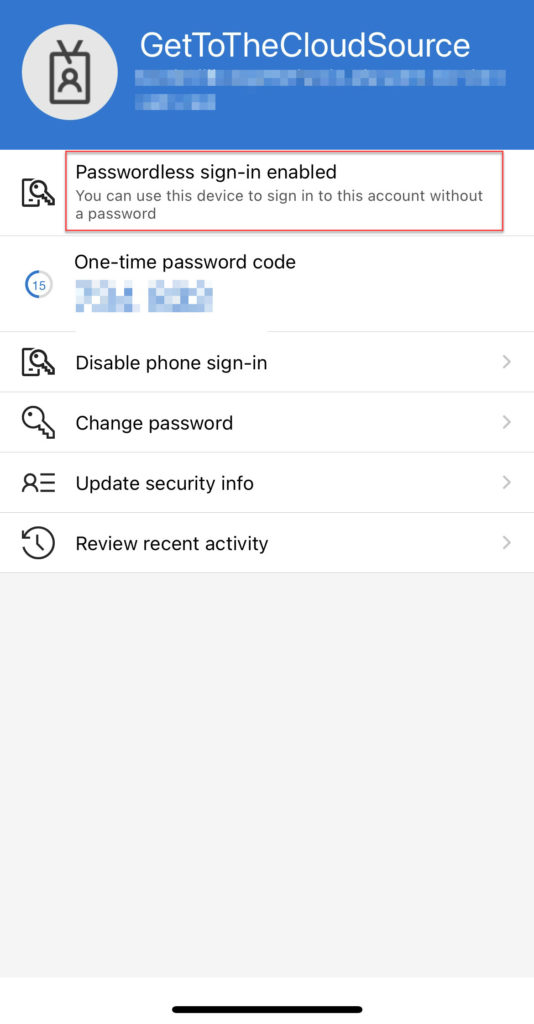
Open the Authenticator App and select the user account that is configured. Select Passwordless Sign-in enabled and follow the signin.

If it is configured correct, when browsing to https://portal.office.com. Enter here the username and click next. A password prompt will appear.
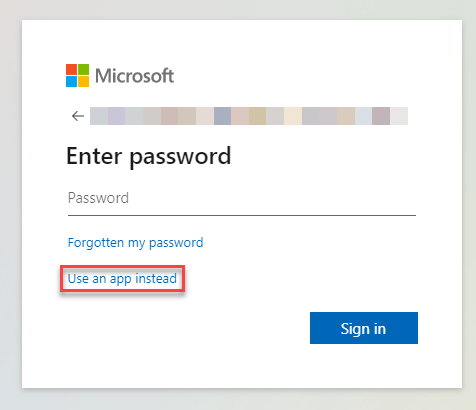
Select here Use an app instead
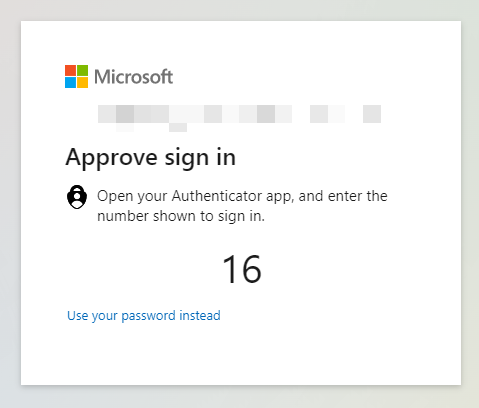
Opening the Authenticator app will give a new prompt
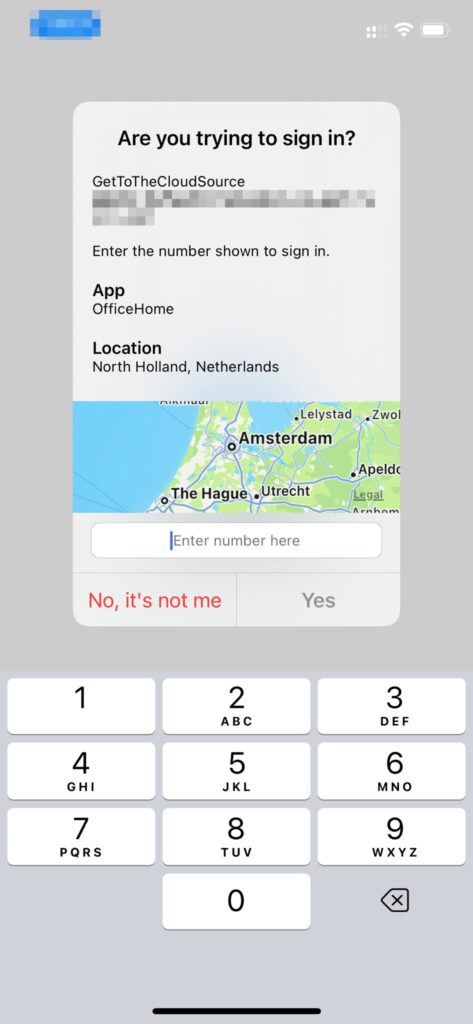
Entering the number showing on the browser, will automatically sign-in the user.

Configuration options

In Microsoft Entra Authentication Policies will give you the possibility to change the policy for passwordless sign-in.
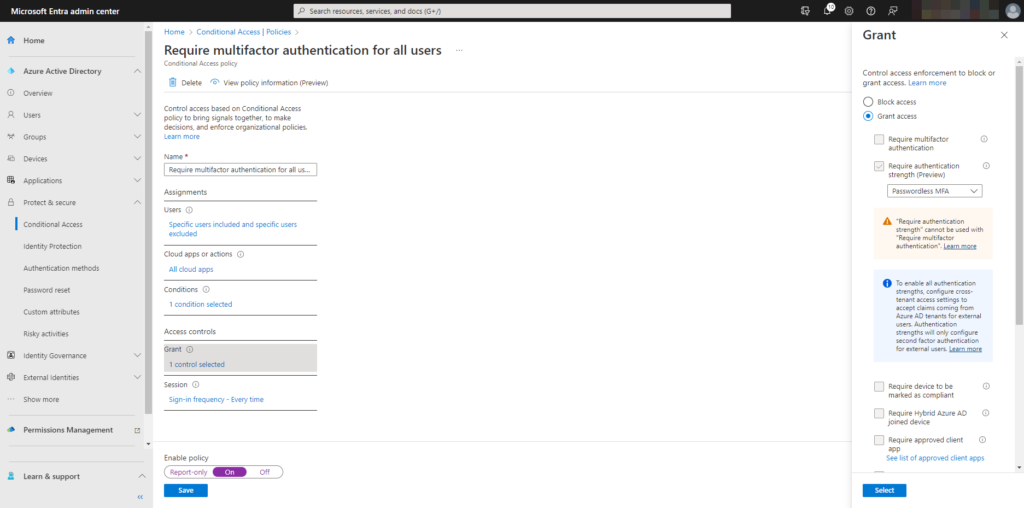
Of course you will be able to configure the policy through Microsoft Graph API.

Share and Enjoy !

Shares
WP Twitter Auto Publish Powered By : XYZScripts.com
We use cookies to personalise content and ads, to provide social media features and to analyse our traffic. We also share information about your use of our site with our social media, advertising and analytics partners. View more
Cookies settings
Accept
Privacy & Cookie policy
Privacy & Cookies policy
Cookie name Active

Who we are

Our website address is: https://www.gettothe.cloud

Comments

When visitors leave comments on the site we collect the data shown in the comments form, and also the visitor’s IP address and browser user agent string to help spam detection. An anonymized string created from your email address (also called a hash) may be provided to the Gravatar service to see if you are using it. The Gravatar service privacy policy is available here: https://automattic.com/privacy/. After approval of your comment, your profile picture is visible to the public in the context of your comment.

Media

If you upload images to the website, you should avoid uploading images with embedded location data (EXIF GPS) included. Visitors to the website can download and extract any location data from images on the website.

Cookies

If you leave a comment on our site you may opt-in to saving your name, email address and website in cookies. These are for your convenience so that you do not have to fill in your details again when you leave another comment. These cookies will last for one year. If you visit our login page, we will set a temporary cookie to determine if your browser accepts cookies. This cookie contains no personal data and is discarded when you close your browser. When you log in, we will also set up several cookies to save your login information and your screen display choices. Login cookies last for two days, and screen options cookies last for a year. If you select "Remember Me", your login will persist for two weeks. If you log out of your account, the login cookies will be removed. If you edit or publish an article, an additional cookie will be saved in your browser. This cookie includes no personal data and simply indicates the post ID of the article you just edited. It expires after 1 day.

Embedded content from other websites

Articles on this site may include embedded content (e.g. videos, images, articles, etc.). Embedded content from other websites behaves in the exact same way as if the visitor has visited the other website. These websites may collect data about you, use cookies, embed additional third-party tracking, and monitor your interaction with that embedded content, including tracking your interaction with the embedded content if you have an account and are logged in to that website.

Who we share your data with

If you request a password reset, your IP address will be included in the reset email.

How long we retain your data

If you leave a comment, the comment and its metadata are retained indefinitely. This is so we can recognize and approve any follow-up comments automatically instead of holding them in a moderation queue. For users that register on our website (if any), we also store the personal information they provide in their user profile. All users can see, edit, or delete their personal information at any time (except they cannot change their username). Website administrators can also see and edit that information.

What rights you have over your data

If you have an account on this site, or have left comments, you can request to receive an exported file of the personal data we hold about you, including any data you have provided to us. You can also request that we erase any personal data we hold about you. This does not include any data we are obliged to keep for administrative, legal, or security purposes.

Where we send your data

Visitor comments may be checked through an automated spam detection service.
Save settings
Cookies settings