
Most Azure Virtual Desktop environments I get called into are secured on the wrong layer. There is MFA on the feed, there is a Defender licence somewhere in the tenant, and everybody feels covered. Then you open the resource group holding the sessionhosts and the entire user group sits there with Virtual Machine Administrator Login.
Every user is a local administrator. On a shared, multi-session, internet-reachable machine that is holding everybody else’s cached tokens.
This is the first post in a three-part series about securing Azure Virtual Desktop and, more specifically, the sessionhosts underneath it. Microsoft documents every individual control well enough. What Learn does not tell you is which of those controls actually matter, what turning them on costs you on Monday morning, and how you prove afterwards that they are genuinely enforced instead of merely configured. That is what this series is for.
In this first part I am not going to give you a settings list. I want to give you the model: what a sessionhost really is, where the boundary between Microsoft and you actually runs, and the path an attacker walks through an AVD estate. Part II and Part III then go deep on breaking that path.
A sessionhost is not a server, and it is not a laptop
We keep reaching for the wrong mental model, and every bad AVD security decision I have seen traces back to that.
If you treat a sessionhost like a server, you harden it like infrastructure. You lock down services, you patch it, you put it behind a firewall, and you assume nobody is sitting at the keyboard. But somebody is sitting at the keyboard. Several somebodies, at once, running browsers and Office macros and whatever they were sent this morning.
If you treat it like a laptop, you go the other way. You accept that the user needs to install things, you loosen the OS, you rely on the endpoint agent to catch what happens. But a laptop is one identity’s blast radius. A pooled sessionhost is not. On a pooled host, one compromised session shares an operating system with every other session on that host, including their processes, their memory and their cached credentials.
A sessionhost is a third thing. It is a multi-user, credential-rich, internet-reachable machine with unmanaged humans typing on it, and it is rebuilt often enough that anything you configure by hand is temporary. Hold that definition in your head for the rest of the series, because every recommendation in Part II and Part III falls out of it.
There is one more property worth saying out loud. A sessionhost is joined to your directory and it usually sits on a network that can reach the rest of your estate. It is not a DMZ box. It is an internal domain-joined machine that you have deliberately exposed to the internet through a broker, and you have handed the keyboard to your least predictable users. That is a very specific risk posture and it deserves a very specific design.
Where the boundary actually runs
Ask five AVD admins who is responsible for what and you get five answers, most of them too generous to Microsoft.
Microsoft owns and secures the control plane. The web feed, the gateway, the connection broker, the diagnostics pipeline, the load balancing logic. It is a managed service, it is patched without you, and you cannot misconfigure most of it. That is genuinely a large chunk of what used to be your problem in a classic RDS deployment, and it is why AVD starts from a better place than the terminal server farm it replaced.
You own everything else, and everything else is where every incident happens.
You own the identity configuration, meaning which users can reach the feed, under what conditions, and with what role on the virtual machines. You own the operating system on the sessionhost, its patch level, its local administrators, its endpoint protection and its baseline. You own the image that OS came from and the pipeline that produced it. You own the network path the host takes outbound and the storage account the profiles live on. You own the redirection settings that decide whether data can leave the session. And you own the logs, or rather, you own whether anybody is looking at them.
Read that list again. Microsoft secured the front door of the building. The rooms, the locks on the rooms, the filing cabinets and the fire exits are all yours.
The path an attacker walks
I find it far more useful to structure AVD security around the chain than around the product list, because the chain tells you what a control is actually for. Six steps, and each one is a place to break it.
Step one: Credential
Somebody phishes a password, or reuses one that leaked elsewhere. On its own this achieves nothing if the second step fails.
Step two: Token
The attacker gets past authentication, either because MFA was not enforced on this path, or because they replayed a token from a device you never evaluated. This is the step most organisations think they have covered and most organisations have covered incompletely, because AVD authenticates in more than one place and policies frequently only target one of them.
Step three: Host
They now have a working session on a sessionhost. This is a full Windows desktop with Office, a browser, PowerShell and network access. From the platform’s point of view nothing wrong has happened at all.
Step four: Elevation
They try to become local administrator, because local admin on a multi-session host is the jackpot. If your user group has Virtual Machine Administrator Login, they do not even need an exploit. You granted it in the portal.
Step five: Data
Profiles. FSLogix containers are writable disks holding browser sessions, cached tokens, saved credentials and documents. A compromised profile follows the user to every host in the pool, which makes it the most persistent thing in an otherwise ephemeral environment.
Step six: Lateral movement
Out of the sessionhost and into the rest of the estate, using the network path and the credentials they collected on the way.
Every control in Part II and Part III is going to be labelled with the step it cuts. If a control does not cut a step, it is hygiene, not security, and it should not be competing for your time.
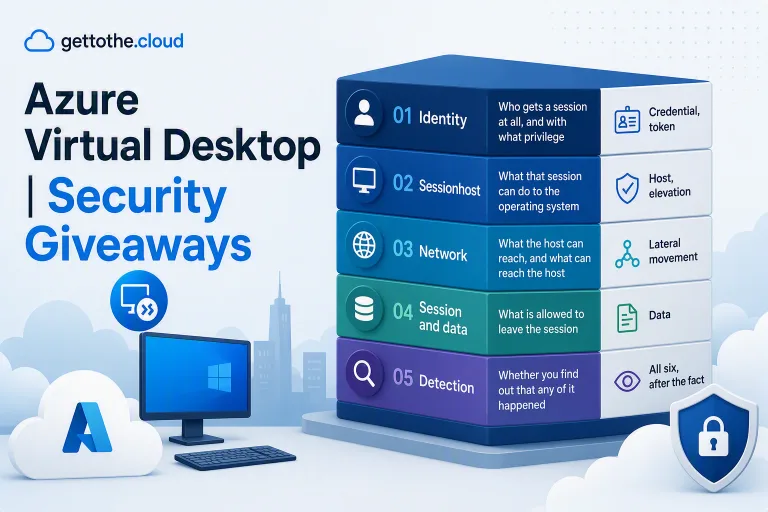
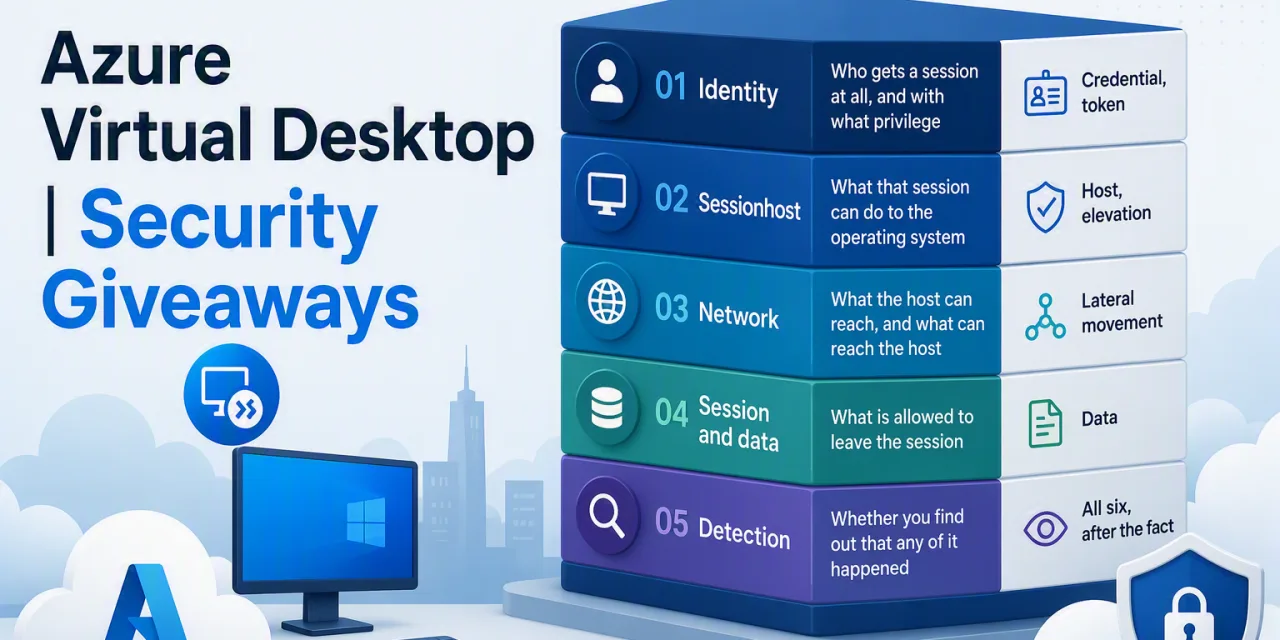
The five layers
The series maps the chain onto five layers. Part II covers the first two, Part III covers the remaining three.
| Layer | What it decides | Steps in the chain it cuts |
| Identity | Who gets a session at all, and with what privilege | Credential, token |
| Sessionhost | What that session can do to the operating system | Host, elevation |
| Network | What the host can reach, and what can reach the host | Lateral movement |
| Session and data | What is allowed to leave the session | Data |
| Detection | Whether you find out that any of it happened | All six, after the fact |
Identity is the highest-leverage layer in the entire environment and it is where the cheapest wins live. The sessionhost layer is where the most work is, because it covers Trusted Launch, local administrator policy, endpoint protection, the security baseline and the image pipeline that makes all of it repeatable. The network layer is mostly architecture, and the good news is that AVD’s reverse connect model has already done half of it for you. The session and data layer is the one your data protection team cares about and the one most posts skip entirely. And detection is the layer that decides whether an incident is contained on a Tuesday afternoon or discovered by somebody else three months later.
Seven takeaways you can act on this week
If you read nothing else in this series, read these. They are ordered by return on effort, not by how interesting they are.
Audit your RBAC assignments today
Virtual Machine User Login lets a user sign in. Virtual Machine Administrator Login makes them a local administrator on every host in scope. If your standard AVD user group has the second one, every operating system control you deploy in Part II is decoration. This is a five-minute check and it is the single most common serious misconfiguration in the wild.
Assume your Conditional Access policy has a hole in it
AVD authentication involves more than one application, and a policy scoped to only one of them leaves a usable path open. Part II lists exactly what to target and why.
Decide Trusted Launch before you build the image, not after
vTPM and Secure Boot are creation-time properties of the virtual machine. Retrofitting means rebuilding hosts, which means you will not do it. Decide it once, at the pipeline.
Treat the golden image as a security control
If you rebuild sessionhosts from a fresh image on a schedule, patch level becomes a build artifact instead of an operational hope, and attacker persistence on the host becomes almost worthless. Ephemeral hosts are a security feature, and if you already have an image pipeline you already own most of the work.
Your profiles are the crown jewels, not your virtual machines
The VMs are disposable. The FSLogix containers are not. Put the storage account behind a private endpoint, use identity-based authentication instead of storage keys, and think hard about who can mount those containers.
Redirection settings are a data loss control, not a user experience setting
Clipboard and drive redirection are the two most common exfiltration routes out of a virtual desktop, and they are usually left at whatever the default was because somebody complained once.
Nobody is reading your AVD logs
Almost every environment has diagnostics enabled and nothing consuming them. Before you buy anything, write down three things that would tell you something is wrong, and go and check whether you could actually detect them today.
What is coming next
Part II goes deep on identity and the sessionhost. Roles, Conditional Access and the two applications you have to target, single sign-on as a security control rather than a convenience feature, Trusted Launch, local administrator policy, Defender for Endpoint and attack surface reduction on a multi-session host, security baselines and the settings that will break FSLogix if you are not careful, and the image pipeline that makes it all repeatable.
Part III covers the network, the session boundary and detection. No public IPs and the reverse connect model, Private Link and the DNS problem that breaks it, egress control with the AVD FQDN tag, RDP Shortpath, redirection and watermarking, and finally what to actually monitor and what bad looks like when it shows up.
To see all this live in action, i have created some bicep files and scripts to setup a demo environment. This way you can check for yourself what it is and what is does. Check https://github.com/GetToThe-Cloud/avd-security-demo