
E-Mail | Security setup SPF

Email security spf
Reading Time: 2 minutes

These days security officers are struggling securing the e-mail and prevent that snooping or MTM (Man in The Middle) attacks. There are various protocols available to secure the e-mail.

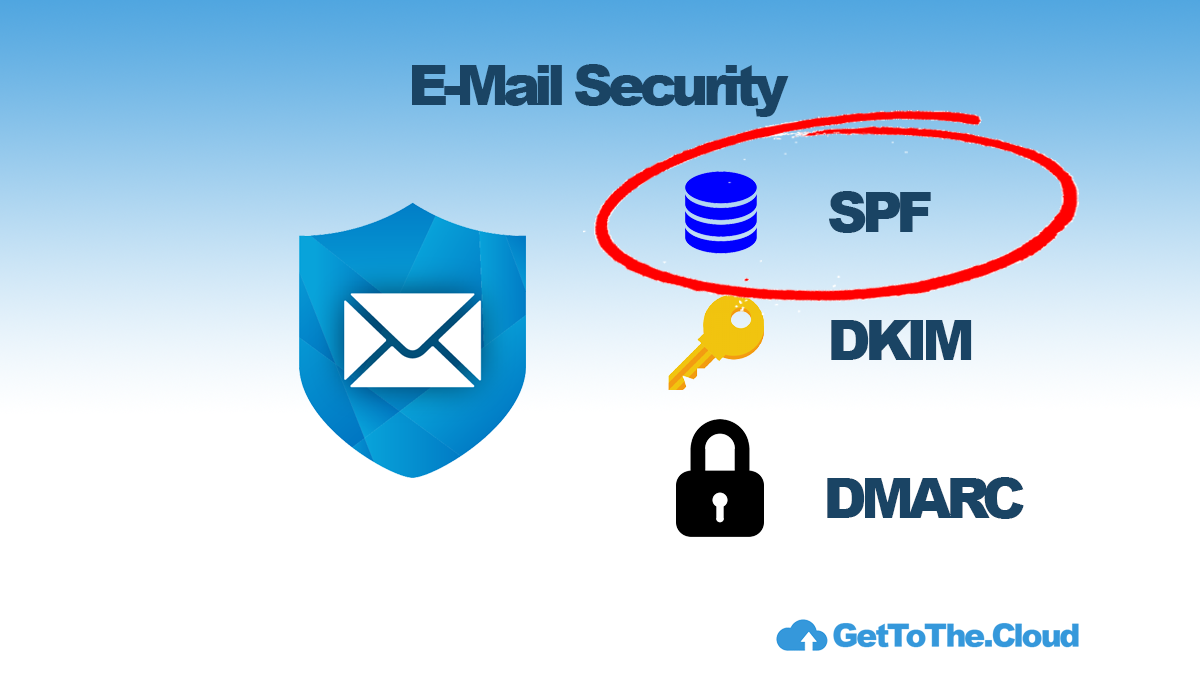
You can use SPF, DKIM or DMARC for securing the e-mail traffic over the internet. The protect against phishing, spam, viruses and other malware by securing the sender (e-mail address/domain), the sending host (mail system) and the authenticity (contents) of an e-mail message. Enabling the standards involves adding records to the domain name’s DNS details. Also is a MTA-STS a possibility to help. Let’s deep dive in SPF.

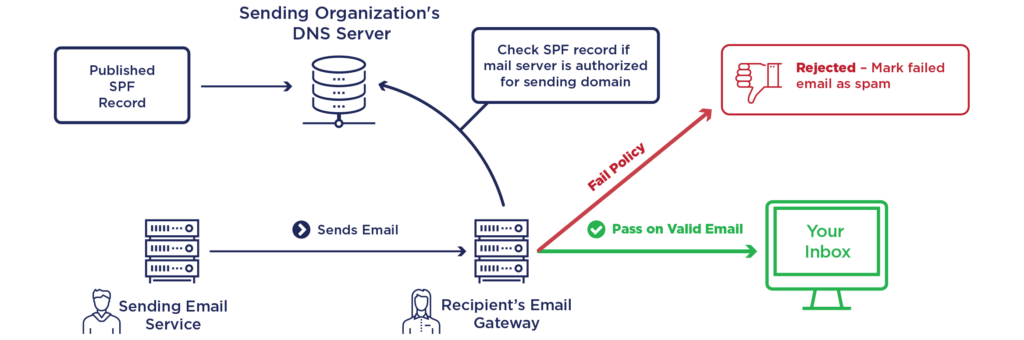
SPF (Sender Policy Framework) records is a standard to help your battle against spam. It is an email authentication standard that protects senders and recipients from spam, spoofing and phishing. By adding this record to your domain, you will provide a list of senders that are approved to send e-mail from your domain.

Why?

You can still send emails without setting up SPF, but having an SPF policy provides an additional trust signal to ISPs so you can increase the likelihood that your emails reach your recipient’s inbox.

SPF won’t solve all of your delivery problems, but it’s an additional layer that, combined with standards like DKIM and DMARC, can improve your delivery rates and prevent abuse.

How does SPF work?

SPF Records might look like complicated and confusing, but they are fairly easy to understand once you know the basics. An example of a SPF record:

v=spf1 a mx include:spf.gettothecloud.eu ~all

Let’s look at the key elements:

The “a” element:

Let’s say that I send mail from IP 57.54.22.137 for the domain “gettothecloud.com”. If “gettothecloud.com” has an A record that returns 57.54.22.137 then this mechanism will pass.

The “mx” element:

Any domain that hosts e-mail has one or more MX records. These records define which email servers can relay email. For example if you use Microsoft 365, there is only one record with the MX and priority 0. This will be the host where the e-mail can be delivered.

The “include” element:

Let’s say that I send mail from IP 57.54.22.137 for the domain “gettothecloud.com”. If the SPF record for “gettothecloud.com” includes spf.gettothecloud.eu and 57.54.22.137 passes against the SPF record for spf.gettothecloud.eu, this mechanism will pass.

The “all” element:

The “all” mechanism will match against everything, and in this case, the result will be a SoftFail for everything that gets to this point.
Setting up an SPF record

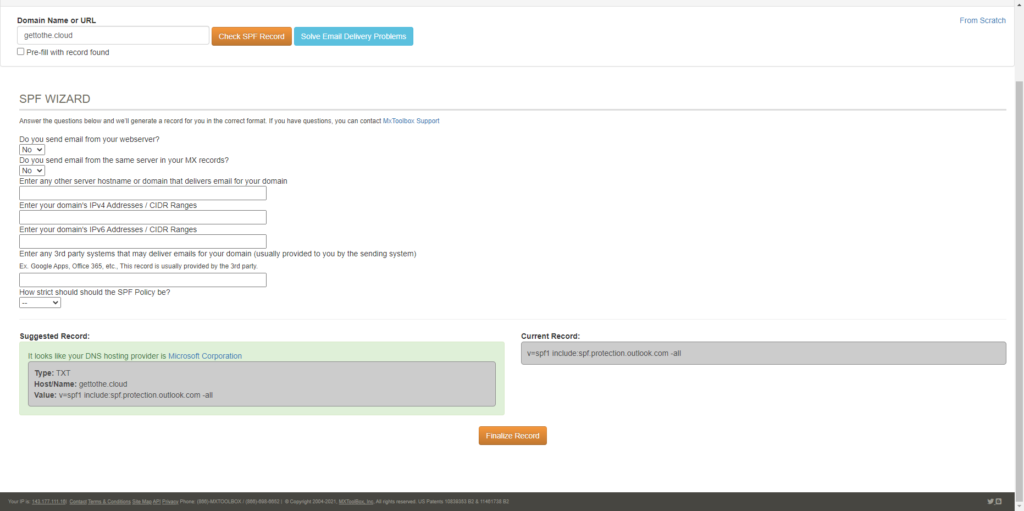
First before you can setup an SPF record on your domain, you need to decide which hosts will be allowed to send e-mail from your domain. If you have done that you can browse to https://mxtoolbox.com/SPFRecordGenerator.aspx to discover first your current SPF record and then use the wizard to generate an new record.

This record can be copied and paste at your DNS settings with your domain provider.
Share and Enjoy !

Shares
Designer (23)

Stay close to the action—follow GetToThe.Cloud across social!
Deep dives and hands‑on how‑tos on Azure Local, hybrid cloud, automation, PowerShell/Bicep, AVD + FSLogix, image pipelines, monitoring, networking, and resilient design when the internet/Azure is down.

🔗 Our channels
▶️ YouTube: https://www.youtube.com/channel/UCa33PgGdXt-Dr4w3Ub9hrdQ
💼 LinkedIn Group: https://www.linkedin.com/groups/9181126/
✖️ X (Twitter): https://x.com/Gettothecloud
🎵 TikTok: https://www.tiktok.com/@gettothecloud
🐙 GitHub: https://github.com/GetToThe-Cloud/Website
💬 Slack: DM us for an invite
📲 WhatsApp: DM for the community link

WP Twitter Auto Publish Powered By : XYZScripts.com
We use cookies to personalise content and ads, to provide social media features and to analyse our traffic. We also share information about your use of our site with our social media, advertising and analytics partners. View more
Cookies settings
Accept
Privacy & Cookie policy
Privacy & Cookies policy
Cookie name Active

Who we are

Our website address is: https://www.gettothe.cloud

Comments

When visitors leave comments on the site we collect the data shown in the comments form, and also the visitor’s IP address and browser user agent string to help spam detection. An anonymized string created from your email address (also called a hash) may be provided to the Gravatar service to see if you are using it. The Gravatar service privacy policy is available here: https://automattic.com/privacy/. After approval of your comment, your profile picture is visible to the public in the context of your comment.

Media

If you upload images to the website, you should avoid uploading images with embedded location data (EXIF GPS) included. Visitors to the website can download and extract any location data from images on the website.

Cookies

If you leave a comment on our site you may opt-in to saving your name, email address and website in cookies. These are for your convenience so that you do not have to fill in your details again when you leave another comment. These cookies will last for one year. If you visit our login page, we will set a temporary cookie to determine if your browser accepts cookies. This cookie contains no personal data and is discarded when you close your browser. When you log in, we will also set up several cookies to save your login information and your screen display choices. Login cookies last for two days, and screen options cookies last for a year. If you select "Remember Me", your login will persist for two weeks. If you log out of your account, the login cookies will be removed. If you edit or publish an article, an additional cookie will be saved in your browser. This cookie includes no personal data and simply indicates the post ID of the article you just edited. It expires after 1 day.

Embedded content from other websites

Articles on this site may include embedded content (e.g. videos, images, articles, etc.). Embedded content from other websites behaves in the exact same way as if the visitor has visited the other website. These websites may collect data about you, use cookies, embed additional third-party tracking, and monitor your interaction with that embedded content, including tracking your interaction with the embedded content if you have an account and are logged in to that website.

Who we share your data with

If you request a password reset, your IP address will be included in the reset email.

How long we retain your data

If you leave a comment, the comment and its metadata are retained indefinitely. This is so we can recognize and approve any follow-up comments automatically instead of holding them in a moderation queue. For users that register on our website (if any), we also store the personal information they provide in their user profile. All users can see, edit, or delete their personal information at any time (except they cannot change their username). Website administrators can also see and edit that information.

What rights you have over your data

If you have an account on this site, or have left comments, you can request to receive an exported file of the personal data we hold about you, including any data you have provided to us. You can also request that we erase any personal data we hold about you. This does not include any data we are obliged to keep for administrative, legal, or security purposes.

Where we send your data

Visitor comments may be checked through an automated spam detection service.
Save settings
Cookies settings