E-Mail | Security setup DMARC
 Alex ter Neuzen
These days security officers are struggling securing the e-mail and prevent that snooping or MTM (Man in The Middle) attacks. There are various protocols available to secure the e-mail.
You can use SPF, DKIM or DMARC for securing the e-mail traffic over the internet. The protect against phishing, spam, viruses and other malware by securing the sender (e-mail address/domain), the sending host (mail system) and the authenticity (contents) of an e-mail message. Enabling the standards involves adding records to the domain name’s DNS details. Also is a MTA-STS a possibility to help. Let’s deep dive in DMARC.
DMARC (Domain-based Message Authentication, Reporting, and Conformance) is a method of email authentication that builds upon the DKIM and SPF (Sender Policy Framework) protocols. DMARC allows domain owners to publish a policy in their DNS records that instructs email servers how to handle email messages that fail DKIM or SPF checks.
Why?
There are several reasons why you should use DMARC to authenticate your email messages:
- Protect your brand reputation: By using DMARC, you can prevent unauthorized use of your domain name in email messages, which can damage your brand reputation and erode customer trust.
- Increase email deliverability: DMARC helps ensure that your legitimate email messages reach their intended recipients by reducing the risk of your messages being marked as spam or rejected by email servers.
- Improve security: DMARC can help protect against email-based attacks such as phishing and spoofing, which can be used to steal sensitive information or install malware on recipients’ devices.
- Gain visibility and control: DMARC provides reporting capabilities that enable you to monitor and analyze the results of email authentication checks across your domain’s email traffic. This can help you identify email-related issues and take corrective action.
- Compliance requirements: DMARC is increasingly being required by organizations and industry regulators as a best practice for email security and compliance. Implementing DMARC can help you meet these requirements and demonstrate your commitment to protecting your customers and your business.
Overall, using DMARC can help you ensure the authenticity and integrity of your email messages, protect your brand reputation, and improve your email deliverability rates, while also providing valuable insights into your email traffic patterns.
How does DMARC work?
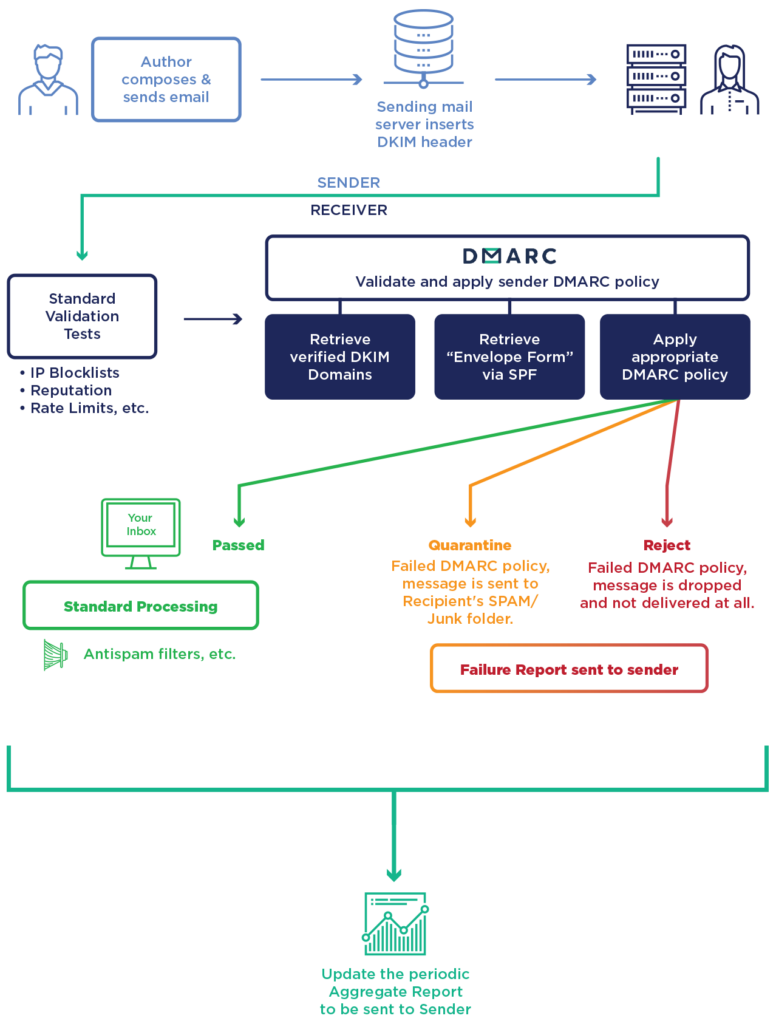
When an email server receives a message, it performs DKIM and SPF checks to verify the authenticity of the message. If the message fails both checks, the email server can use the DMARC policy published in the domain’s DNS records to determine how to handle the message.
The DMARC policy includes several key elements:
- Policy type: The policy type specifies whether the domain owner wants to receive reports about failed authentication attempts (“none”), have the messages quarantined for review (“quarantine”), or have the messages rejected outright (“reject”).
- Identifier alignment: DMARC requires that either the DKIM or SPF identifier in the message header aligns with the domain name in the “From” field of the message. This helps prevent spoofing and phishing attacks that use forged sender addresses.
- Reporting address: The reporting address is the email address where DMARC reports are sent. These reports provide information about the authentication results for the domain’s email traffic and can help identify potential email security issues.
When an email server receives a message that fails DKIM and SPF checks, it checks the DNS records for the sender’s domain for a DMARC policy. If a policy is found, the server follows the instructions in the policy to handle the message. For example, if the policy is set to “quarantine,” the server may deliver the message to the recipient’s spam folder. If the policy is set to “reject,” the server will reject the message outright and prevent it from being delivered.
Setup DMARC
- Determine your DMARC policy: You will need to decide what action you want the email server to take if a message fails DMARC authentication. You can choose to “none” (only receive reports), “quarantine” (mark the message as spam), or “reject” (block the message). We recommend starting with “none” to monitor the impact on your email traffic before moving to a more aggressive policy.
- Generate a DMARC record: A DMARC record is a DNS TXT record that contains your DMARC policy. You can use a DMARC record generator tool to create a DMARC record. The record should include your domain name, the policy type, identifier alignment, and reporting address.
- Publish the DMARC record: Once you have generated your DMARC record, you will need to publish it in your domain’s DNS records. This can typically be done through your domain registrar or hosting provider.
- Monitor DMARC reports: DMARC provides reporting capabilities that enable you to monitor and analyse the results of email authentication checks across your domain’s email traffic. You can use DMARC reporting tools to view and analyse these reports.
- Gradually tighten your DMARC policy: Once you have analyzed your DMARC reports and are confident that your legitimate email is being authenticated correctly, you can gradually tighten your DMARC policy to “quarantine” or “reject” messages that fail authentication.
v=DMARC1; p=none; rua=mailto:dmarc-reports@gettothe.cloudThis DMARC record includes the following elements:
- “v=DMARC1” indicates that this is a DMARC record and specifies the DMARC version.
- “p=none” specifies the DMARC policy type. In this case, the policy is set to “none”, which means that the email server will not take any action based on the DMARC policy. This is often used initially to monitor the impact on email traffic before moving to a more aggressive policy.
- “rua=mailto:dmarc-reports@gettothe.cloud” specifies the email address to which DMARC aggregate reports will be sent. This email address should be configured to receive and process the DMARC reports.
This DMARC record tells receiving email servers that they should check SPF and DKIM authentication for incoming messages and report the results back to the sending domain. The “none” policy type allows the domain owner to monitor and analyse the results of email authentication checks without affecting email delivery. Once the domain owner is confident that legitimate email is being authenticated correctly, they can move to a more aggressive policy, such as “quarantine” or “reject”, to block or mark as spam messages that fail DMARC authentication checks.
How to test DMARC?
To test DMARC, you can follow these general steps:
- Publish a DMARC policy with the “none” policy type: This will allow you to receive DMARC reports without impacting your email traffic.
- Send test messages: Send messages from various email addresses and domains to your own email accounts, making sure to include messages that pass and fail DKIM and SPF checks.
- Check DMARC reports: After a few days, check the DMARC reports to see if they are being generated and received correctly. DMARC reports provide information about the authentication results for the domain’s email traffic and can help identify potential email security issues.
- Analyze the reports: Review the DMARC reports to see if any issues are identified, such as messages that fail authentication or unexpected sources of email traffic.
- Adjust the DMARC policy: Based on the results of your analysis, adjust your DMARC policy as needed to ensure that legitimate email is being authenticated correctly and that unauthorized email is being appropriately handled.
- Test again: After making changes to your DMARC policy, send test messages and check DMARC reports again to ensure that the changes are working correctly.